See Where Your Church Members Actually Live
Map your congregation and organize home groups by proximity—no more guessing with spreadsheets and ZIP codes.
No credit card required
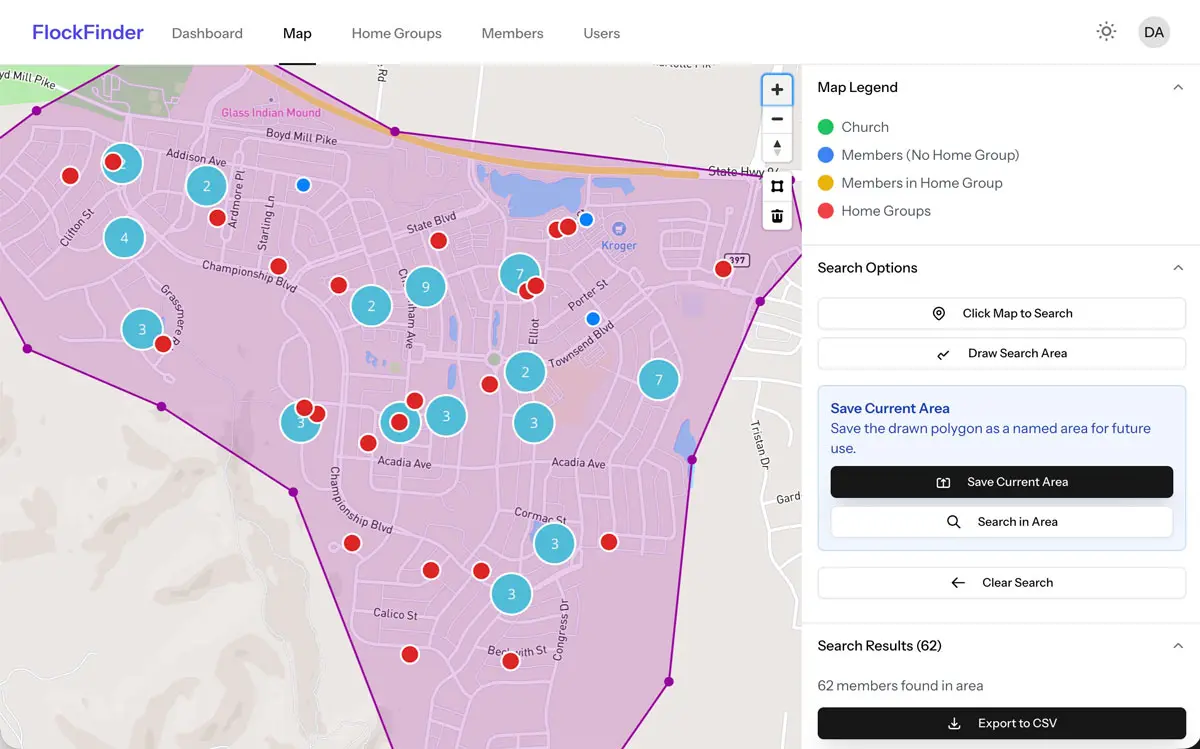
You Already Know WHO Your Members Are—But WHERE Do They Live?
Spreadsheets with addresses don't show you patterns. ZIP codes don't show you clusters. FlockFinder turns your member directory into actionable geographic intelligence.
Common Struggles
- Planning events without knowing optimal locations for maximum attendance
- Identifying members near new and existing home groups
- Spreadsheets and address books that don't show geographic relationships
FlockFinder Solution
- Choose optimal locations for events based on member density
- Help members find and connect with others living nearby
- Visual map interface with powerful search and filtering tools
Everything You Need, Organized by Location
Home Group Organization
Draw a circle around a host home and instantly see all members within 2, 5, or 10 miles. Form geography-based small groups in minutes, not hours.
Pastoral Care by Neighborhood
Assign care team members to geographic zones. Plan efficient visit routes. Ensure no one is overlooked because they're "too far away."
Automatic Planning Center Sync
Import all your members instantly. Real-time webhooks keep addresses and groups automatically synchronized. No manual data entry.
Powerful Search & Filtering
Filter by distance, age group, family status, involvement level, tags, and custom fields. Find exactly who you need for any church initiative.
Find Optimal Event Locations
See where member concentration is highest. Plan community events, baptisms, or gatherings at locations that maximize attendance.
Export & Share Results
Turn geographic searches into actionable contact lists. Export custom fields for emails, mailing labels, or your team's workflow. No data trapped on the map.
Trusted by churches that connect.
"FlockFinder is one of our first steps when people come to us with questions. It has been incredibly helpful to quickly and accurately introduce people to their area's pastor, and make a big church feel more attentive and accessible. It has been helpful in re-defining our area lines and bringing clarity to how our church is organized geographically. The ability to easily find, filter, and view members within specific areas has saved us time and made our processes more efficient."
Church of The City
See FlockFinder In Action
Real tools churches use to organize by geography
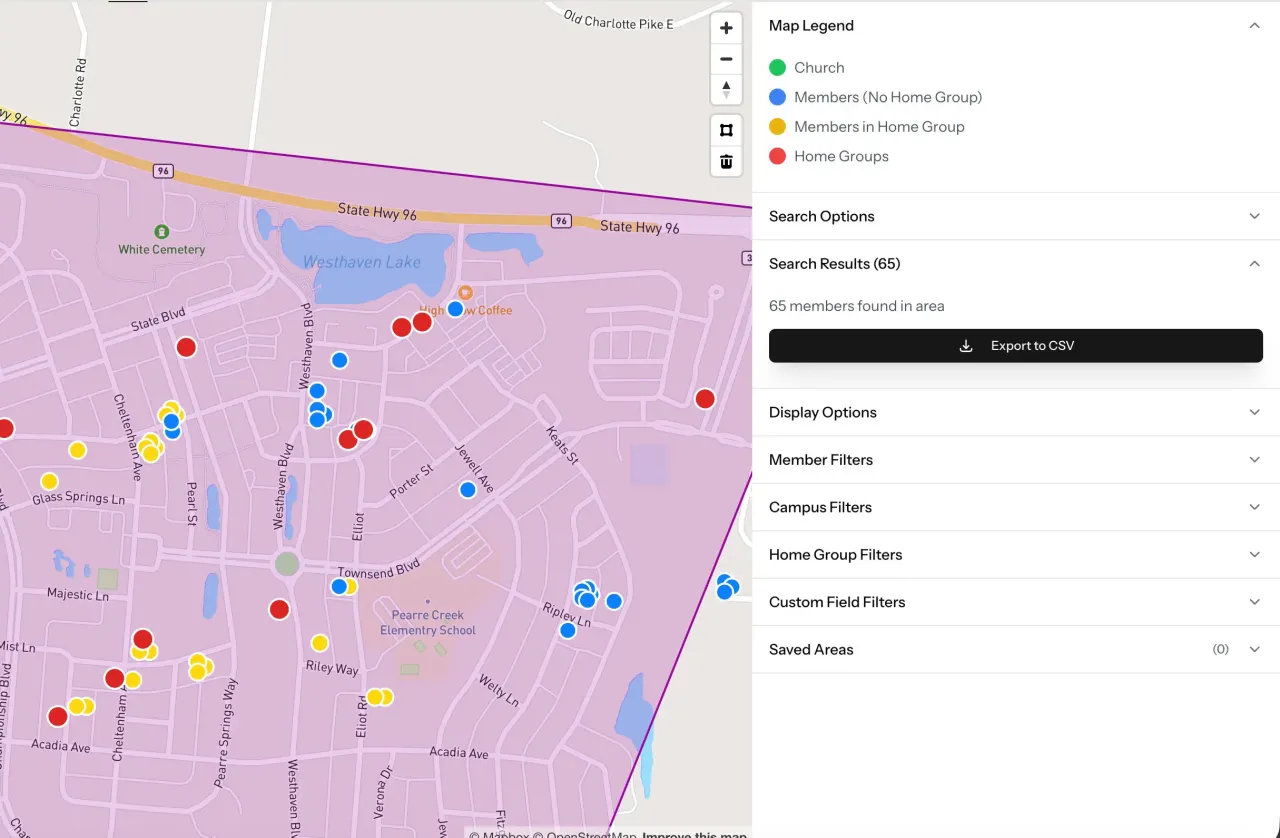
Organize Home Groups Visually
Draw custom areas on the map to see who lives nearby. Identify unassigned members and create balanced groups based on geography.
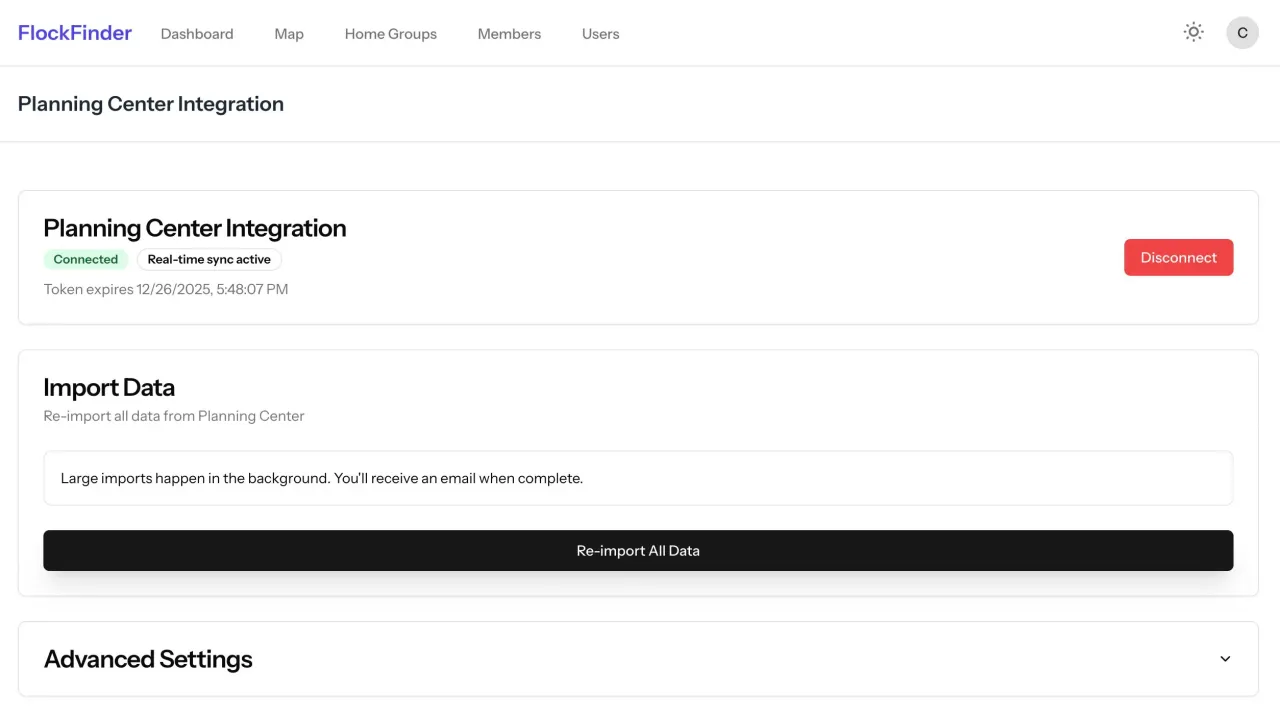
Works With Your Planning Center Data
One-click sync. No CSV exports, no manual updates. Your member data stays current automatically.
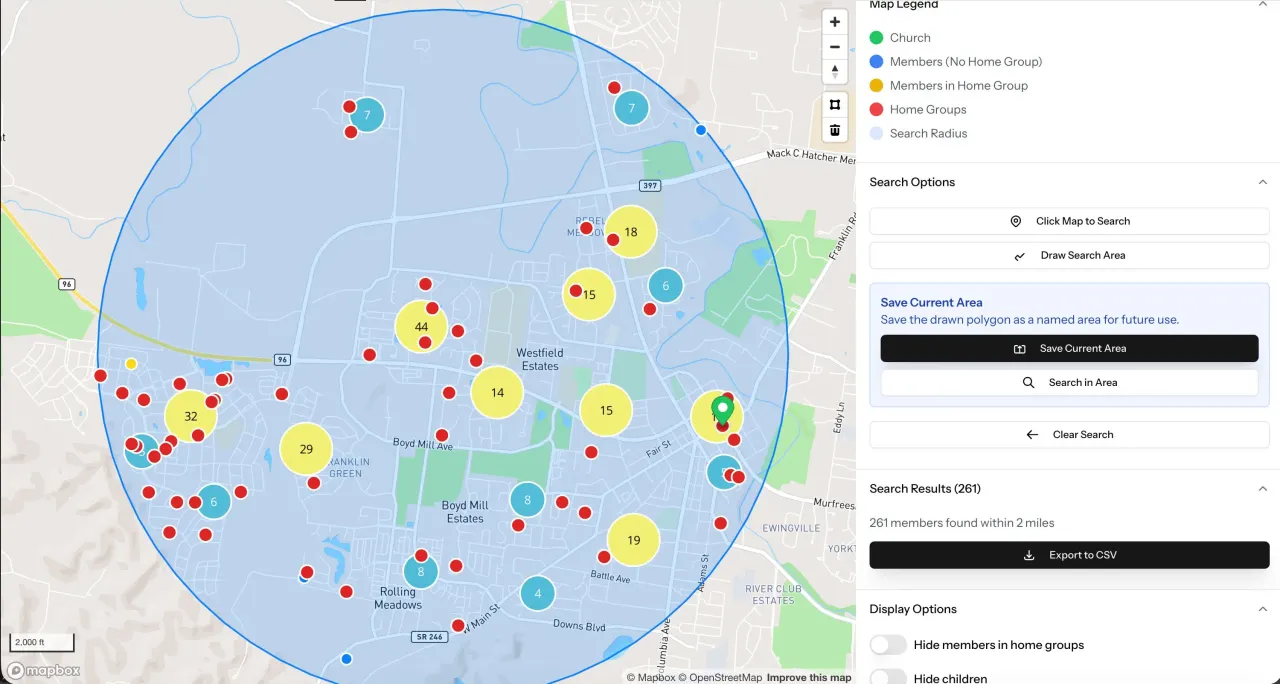
Find Everyone Within Any Distance
Plan events, coordinate visits, or analyze coverage. Search by radius and export results for your team.
Get Started in 3 Simple Steps
Connect Planning Center
FlockFinder reads your existing members from Planning Center (or a CSV) and keeps addresses in sync with real-time webhooks. It's an add-on — Planning Center stays your system of record.
See Where People Live
Your members appear on a private map — visible only to your church, never public. Filter by distance, age, or involvement.
Act on Location
Type any address to see the home groups nearby, or find the members near an event or emergency to reach out and help.
How Churches Actually Use FlockFinder
Real scenarios from real church leaders
"Who lives near our new member?"
Sarah just joined your church and lives on Maple Street. You want to connect her with other members nearby for community.
→ Search "Maple Street," draw 3-mile circle, filter for families with kids, export list with contact info. Done in 60 seconds.
"Where should we start our next home group?"
You have 25 members in the Riverside neighborhood but no existing small group there.
→ Draw polygon around Riverside area, see 25 members clustered, identify potential host home at the center. Launch decision made.
"How do we divide up pastoral care efficiently?"
You have 4 elders but they're criss-crossing town for visits, wasting hours in the car.
→ Draw 4 geographic zones, assign one elder per zone. Elder John now visits 8 families within 10 minutes of each other.
"Where should we host our community BBQ?"
You want maximum turnout but don't know which park is most central to your members.
→ View your full congregation map, identify visual center of member cluster. Pick the park at that location. Attendance up 40%.
Free for churches under 100 members · No credit card required
Pricing
Plans for churches of all sizes
Free
$0/month
Try FlockFinder with basic features
- Up to 100 members
- 1 user
- CSV import/export
- Basic map features
Starter
$19/month
or $190/year (save $38)
14-day free trial (monthly) · 30-day free trial (annual)
Planning Center integration included
- Up to 500 members
- 2 users
- Planning Center sync
- All Free features
Premium
$29.99/month
or $299/year (save $60)
14-day free trial (monthly) · 30-day free trial (annual)
Everything you need to grow
- Unlimited members
- 10 users
- 🚗 Drive-time analysis
- Custom fields
- All Starter features
Frequently Asked Questions
Does FlockFinder replace Planning Center or my member directory?
No. FlockFinder is an add-on, not a replacement. Planning Center (or your existing directory) stays your system of record — FlockFinder reads from it to show where your people live and organize groups by location. It's also not a public map: your members are visible only to your church.
How does FlockFinder integrate with Planning Center?
FlockFinder reads your members from Planning Center People via secure OAuth — it doesn't replace Planning Center, it works alongside it. Real-time webhooks keep addresses and group info in sync.
What if we don't use Planning Center?
No problem! You can import your member list via CSV/Excel file. We provide a sample template, and you can re-import anytime to update addresses.
How do you protect member privacy and data?
All data is encrypted at rest and in transit. Only users you invite can see your church's data. Members control what location information they share, and you can set permissions by role (Admin, Editor, Viewer).
Can I use this to organize home groups by location?
Yes! This is the #1 use case. Draw a circle around a host home, see all members within your target distance, filter by age/life stage if needed, then export the list to start your group.
Is FlockFinder good for multisite churches?
Yes! You can add each campus as a separate marker on the map, then use radius or polygon searches to see which members live closest to each campus location. This helps identify optimal campus zones and organize campus-specific small groups geographically.
From the blog
All articles →- Can Planning Center Map Your Members? What It Does and What It Doesn'tOct 02, 2026
- How Pastors Use Geographic Data for Pastoral Care, Not Just Small GroupsJun 01, 2026
- Why Your Church Small Groups Directory Needs To Be Location BasedMay 15, 2026
- The Hidden Cost Of Disconnected Small Group Systems And How Churches Can Fix ItMay 04, 2026